Write with Poppy
Draft pitches, follow-ups and replies with Poppy in message templates, the Compose sheet and sequence steps: purpose, tone, language, variables, variants and what it costs.
Write with Poppy drafts the email for you: a first pitch, a follow-up, a rate card or a payment reminder. It writes in your voice, using what Pointerly knows about you and the brand. You review the draft and decide what to keep. Nothing is sent or saved until you do it yourself.
Where you'll find it
| Place | What Poppy writes |
|---|---|
| Templates → New template (or Edit) | A reusable message that keeps variables such as {{brand_name}} |
| Compose on a deal | A ready-to-send email for this brand, from your CRM and rate card |
| Sequences → a step (next to Start from template) | A step message that keeps variables, so each deal fills in its own |
Steps
1. Open Write with Poppy
Click Write with Poppy in the message step of the template, Compose sheet or sequence step.
2. Tell Poppy what you need
- Purpose: First pitch, Follow-up, Reply, Negotiation, Rate card, Thank you, Payment reminder or Something else
- Tone: Warm, Professional, Playful, Concise or Bold
- Language: English, Spanish, Portuguese, French, German or Italian
- Goal (optional), for example get a paid review in November
- Season or campaign (optional), for example Black Friday
- Use the conversation as reference (in Compose only): Poppy reads this deal's recent emails, so a reply follows the thread
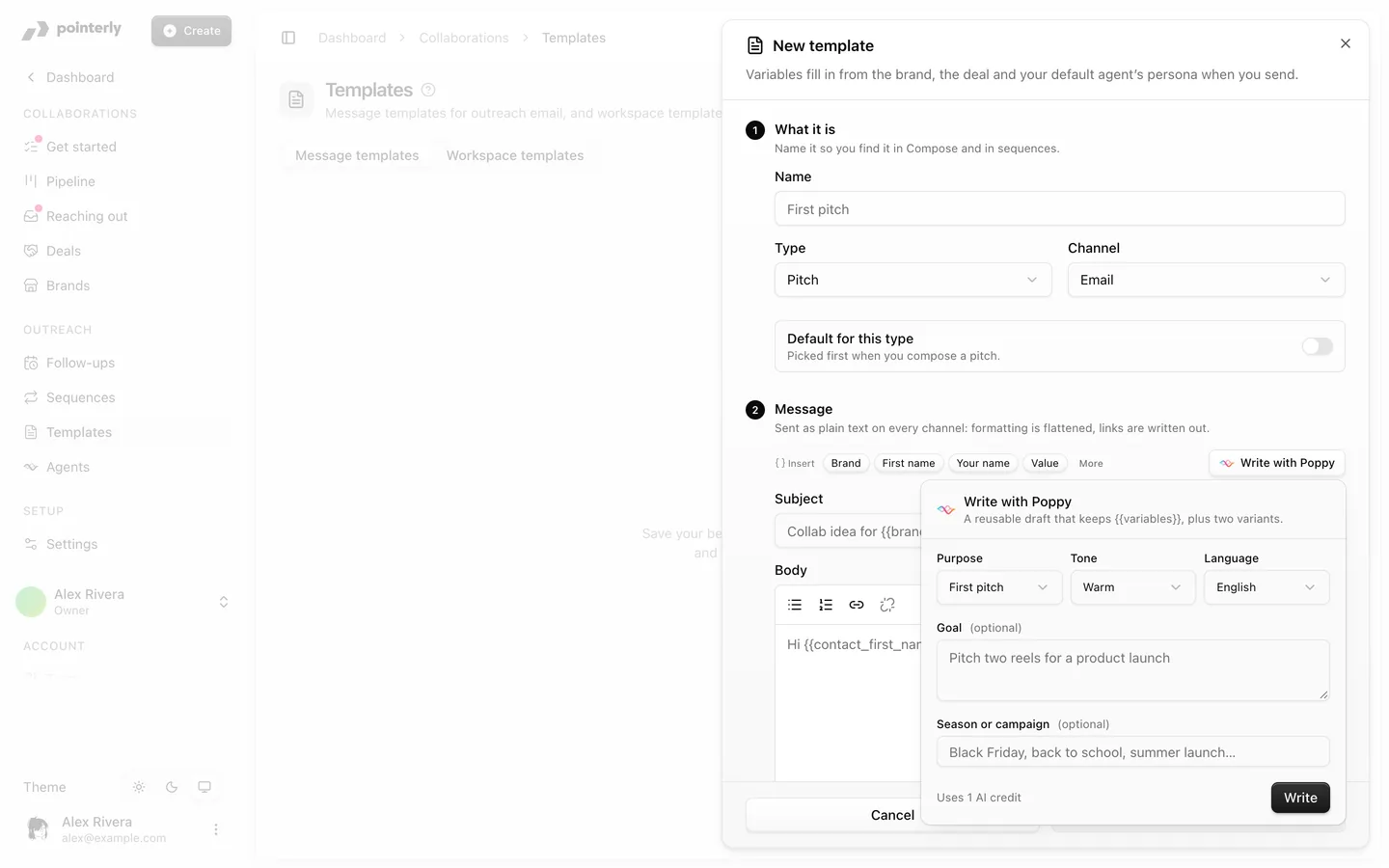
3. Write and pick a version
Click Write. Poppy returns a Draft and two alternatives, Variant 1 and Variant 2. Click Apply on the one you like. It replaces the subject and message, so review it before you save or send. Not quite right? Click Write again.
Variables
Templates and sequence steps keep variables, so one message works for every brand:
| Variable | Fills in |
|---|---|
{{brand_name}} | The brand |
{{contact_first_name}} | The contact's first name. If it's missing: "Brand team", then "there" |
{{contact_name}} | The contact's full name |
{{creator_name}} | Your name |
{{my_handle}} | Your handle |
{{deal_title}} | The deal |
{{deal_value}} | The deal value |
{{rate_card}} | Your rate card |
{{media_kit_url}} | Your media kit link |
Insert them with the chips under the message: Brand, First name, Your name and Value, with the rest under More. Only {{contact_first_name}} has a fallback. If any other variable has no value for a brand, you're asked to fill it in or remove it before sending.
What it costs
Each Write uses 1 AI credit from your workspace's AI credits. Applying a draft or editing it is free.
When Poppy reads email (Use the conversation as reference), it uses a private AI route for sensitive data. See AI settings and sensitive data.
Tips
- Write a template once with Poppy, then reuse it. It's faster and cheaper than generating every email.
- Add a Goal to make the call to action specific.
- Keep your rates and media kit up to date, in the media kit card on an agent's Instructions tab or in your creator profile, so drafts quote the right numbers.
Common questions
Does Poppy send the email? No. Poppy only fills in the message. You send it, or a sequence sends it on its day if you turned on Send steps automatically.
Can I use Write with Poppy without the Collaborations add-on? No. It's part of Collaborations. Poppy in the dashboard panel can still help you write in general.