Get started with Collaborations
The five setup steps: connect your inbox, bring in your brands from a spreadsheet or Notion, let Pointerly study your inbox, review its suggestions, and put an agent to work. What the inbox study reads, what it costs, and what happens when it pauses.
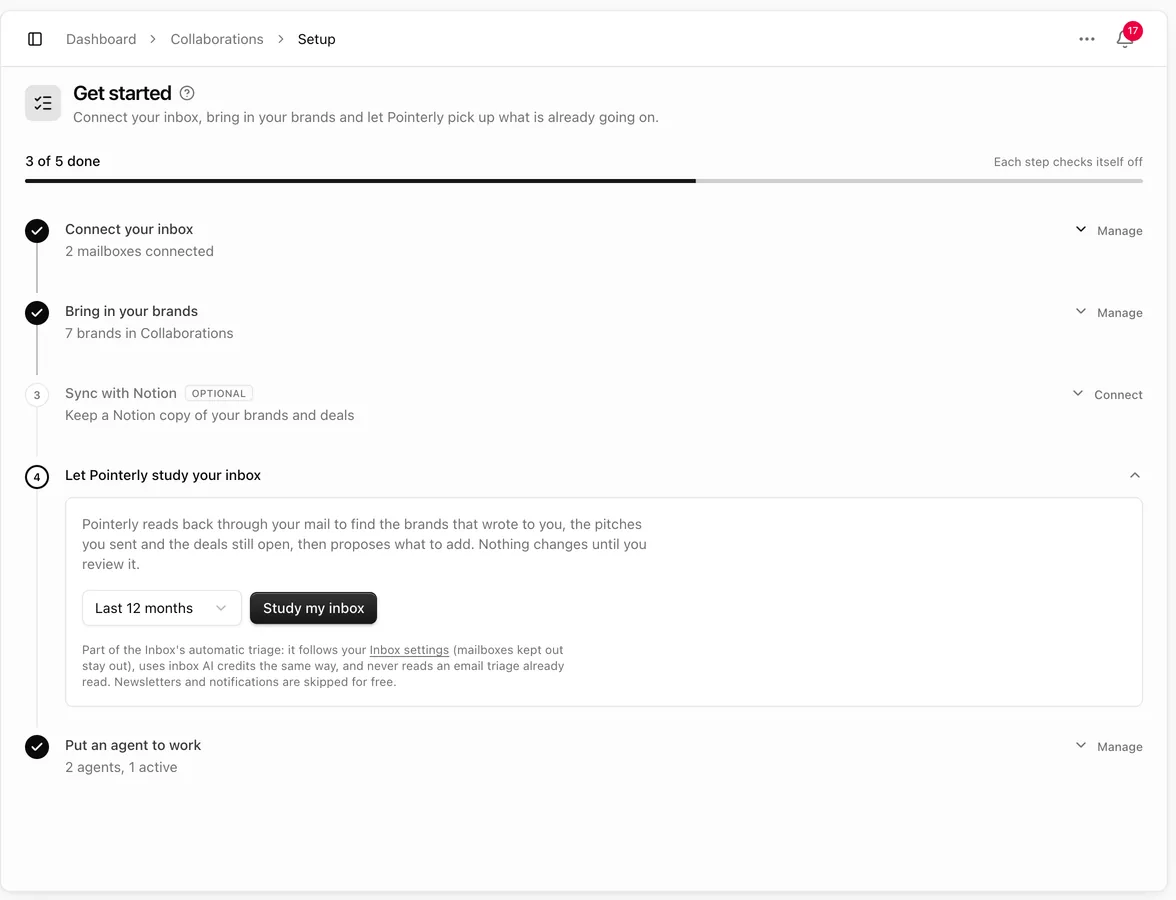
Collaborations → Get started walks you from a connected inbox to agents working on your brands. Each step checks itself off when it is done, wherever you did it, and the bar at the top shows how many are done. Open a step to work on it, or Manage a step that's already done.
1. Connect your inbox
Collaborations works from your email: brands that write to you, the pitches you send, follow-ups and contracts. Connect Gmail, Outlook or another mailbox in Integrations. Replies and follow-ups go out from the mailbox you choose.
2. Bring in your brands
- Import a file. Upload a CSV or Excel file with your brands. Pointerly reads the columns and suggests what each one is (brand, website, contact, email, status, budget…), including what your own words mean, like "No contactar" or "Activa". Check the mapping, then import. Brands you already have are matched instead of duplicated. If you reach your plan's brand limit, the import pauses and continues from the same row once you add room.
- Add by hand from Brands.
- From Notion, in the next step.
3. Sync with Notion (optional)
Connect a Notion database and Pointerly imports it once. From then on Pointerly is the source of truth: it keeps your Notion copy up to date, and new rows and empty fields in Notion still come in. If you edit a value in Notion that Pointerly already has, Pointerly writes its own value back. To let edits made in Notion update Pointerly instead, turn on Apply edits made in Notion on that database. See Notion and Collaborations.
4. Let Pointerly study your inbox
Choose how far back to look (3, 6, 12 or 24 months). Pointerly looks through your received and sent mail, skips newsletters and notifications for free, and reads the conversations with brands to find:
- brands that wrote to you and are not in Collaborations yet,
- deals to open, or to move forward when the conversation went further,
- follow-ups that are due: a brand waiting for your reply, or a pitch with no answer.
Nothing changes until you review it. Open Review to see each suggestion with its type (New brand, New deal, Move deal or Follow-up), the brand and what it found in your inbox. Click one to see what applying it does, the summary and the emails it came from; View email opens any of them in a side sheet. Then Apply or dismiss it, one at a time or several at once. Suggestions that would change a brand or deal you imported from Notion ask first, because the change is written back to Notion too. Applied suggestions keep the email threads on the brand or deal timeline.
The study is part of the Inbox's automatic triage: it follows your Settings → Inbox choices (mailboxes kept out stay out), never reads an email triage already read, and what it reads shows up labelled in your Inbox.
Progress. The card shows how far back it has looked and how many conversations it has read. It keeps going in the background; you can leave the page. Finish now turns what was read so far into suggestions. Cancel stops it and discards it.
Cost and pauses. Reading conversations uses inbox AI credits, the same way automatic triage does. Mail only goes to an OpenAI key that keeps your data private:
- With your own OpenAI key in Settings → AI, nothing is charged.
- Otherwise it uses your AI credits, and needs AI pay-as-you-go with a spending cap in Billing once they run out.
If one of these is missing, the study pauses and says what to do. It continues on its own within about 15 minutes once it is fixed, or right away with Resume now.
5. Put an agent to work
Agents read brand emails, qualify them, reply with your rates and follow up. Set your rates, packages and seasons in the Rates section of the agent's Instructions tab and check them with Try a quote. Then choose for each action whether the agent does it on its own or asks you first. Until you allow an agent to send, its emails are saved as drafts in your mailbox. See Collaboration agents.
Brands that email you while you set up already wait on Reaching out. See Brands reaching out.