Rewards FAQ and troubleshooting
Answers to common Rewards questions: referrals that didn't pay, credits not used, pay-as-you-go requirements, missing challenges, account credit, layout differences, announcements and permissions.
Quick answers for the questions creators ask most about Rewards. Each one points to the article with the full details.
What you'll achieve
- Work out why a referral, credit, challenge or claim didn't do what you expected
- Know who in a workspace can see and use Rewards
- Find Rewards in both navigation layouts
Before you start
- Check the team switcher first. Rewards, invite links and credits are per workspace, so the wrong workspace is the most common cause of "missing" rewards.
- Program amounts, holds and expiry lengths are set by Pointerly staff. The terms on each reward are what apply.
Referrals
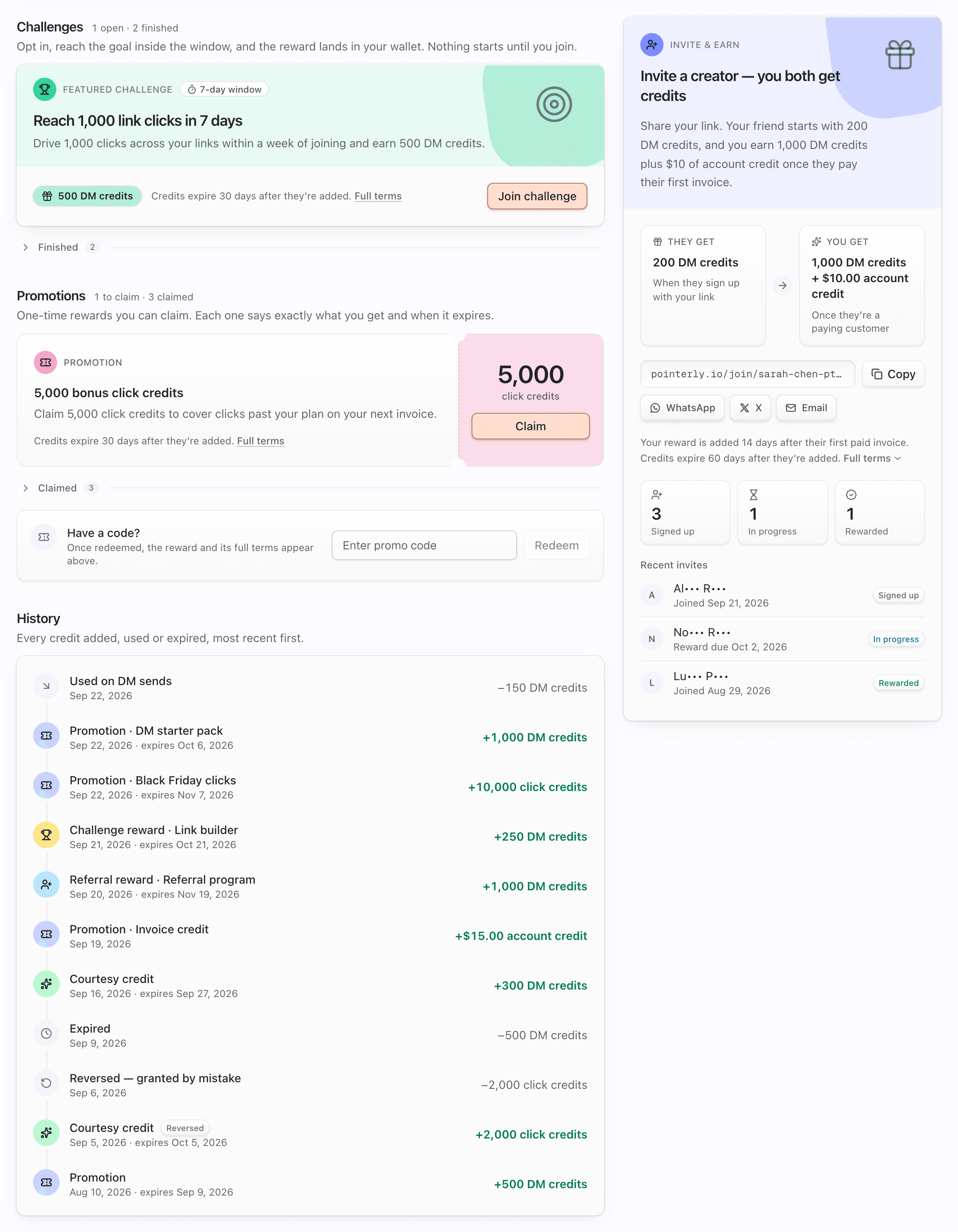
My referral didn't pay. Why? Open Dashboard → Rewards → Invite & earn and read the invite's status:
| Status | What it means | What happens next |
|---|---|---|
| Signed up | They haven't paid an invoice above $0 yet | Nothing until their first paid invoice. Free plans, trials and 100% coupons don't count |
| In progress + Reward due <date> | They paid. The hold (for example 14 days) is running | Paid by the rewards job (every 30 minutes) after that date |
| In progress with no due date | Staff are reviewing the invite (for example the same person is in both workspaces) | Staff approve it or mark it Not eligible |
| Reversed | One of their payments was refunded or disputed during the hold | Final. No reward for this invite |
| Not eligible | Declined in review, or your workspace reached the program's limit (for example 20 rewarded invites) | Final |
If the invite isn't listed at all, it was never recorded. Common reasons: they opened someone else's invite link first, signed up in a different browser than the one they opened your link in, their workspace was more than 14 days old when it first opened the dashboard, the workspace had already been invited, or no referral program was running at that moment. Invites can't be added after the fact. See Invite creators and earn.
Where's my invite link?
Dashboard → Rewards → Invite & earn, with Copy and share buttons. Shortcuts: the Invite & earn card in the sidebar deck (sidebar layout) or in What's new & more (top bar layout) has a copy button. The card only appears while a referral program is running. Your link looks like https://pointerly.io/join/<code>.
The person I invited says the link "isn't active anymore". No referral program is running right now (or the code was mistyped). They can still sign up, but the invite won't be recorded. If the page says the program is full, every reward has been handed out for now: same result, no welcome gift and no invite recorded.
Credits
My reward credits aren't being used. Reward credits only cover usage above your plan's included amount, and they're always used before pay-as-you-go. If you're still inside your plan, they sit unused and may expire. DM credits are taken as each DM is sent. Click, automation-run and routine-run credits are taken when the cycle's usage invoice is prepared, so the balance doesn't move mid-cycle. The Billing invoice preview already subtracts them. Click and automation-run credits are also kept (not spent) while pay-as-you-go for that meter is off, because that overage isn't billed. See The rewards wallet.
In what order are credits used? DMs: purchased DM credits → plan DMs → reward DM credits → overdraft → pay-as-you-go. Clicks: plan → purchased click credits → reward click credits → pay-as-you-go. Within reward credits, the batch that expires soonest goes first.
My credits disappeared. They probably expired. Look for an Expired row in History. The workspace owner gets a reminder about 3 days before.
I got extra links, WhatsApp sends or AI credits, but the wallet doesn't show them. Those are added straight to that balance or limit, so they appear in History and on the matching Billing meter (Includes +N … from Rewards), not as wallet tiles.
Challenges and promotions
A claim or join says "Turn on pay-as-you-go in Billing to join this." That challenge or promotion requires pay-as-you-go for DMs or clicks. Click Turn on pay-as-you-go (it opens Billing → Add-ons, where the pay-as-you-go controls are), switch on the meter the note names, then try again. Pay-as-you-go needs a card on file.
Why don't I see a challenge (or promotion) someone else sees?
- It may be limited to certain plans.
- It may be for new workspaces only (created after it started, or after it went live if it has no start date).
- It may have ended, not started yet, or run out. Ones that aren't open are hidden unless you already joined or claimed them.
- Promo-code promotions are hidden until you redeem the code.
- You may be looking at a different workspace.
Challenges and promotions you can see but can't use show a note explaining why (for example This one isn't available on your current plan.). See Challenges and Promotions and promo codes.
I finished a challenge but have no reward yet. Challenges are checked about every 30 minutes. If you reached the goal before your window closed, the reward arrives on the next check, even after the deadline.
My promo code says "That code is not valid". Check the spelling. Codes aren't case-sensitive, but they must match exactly otherwise. A code also stops working when its promotion is paused or ended.
Account credit and invoices
My account credit wasn't on my invoice. Account credit is used on the next invoice issued after it reaches your Stripe balance. A workspace that has never checked out has no billing account yet, so the credit waits and is added once one exists. Check Billing → Overview for Account credit $X — applied to your next invoice before your card is charged and the Account credit row in the invoice summary. See Account credit and invoices.
Will a reward add-on charge me when it ends? No. Add-ons from Rewards show Reward · ends <date>. They end on that date, are never charged, and never renew.
Layout and announcements
Top bar vs sidebar: where's everything?
| Sidebar layout | Top bar layout | |
|---|---|---|
| Rewards page | Account group in the sidebar | Account group in the navigation |
| Invite & earn card | Sidebar footer deck (hover or tap to open) | What's new & more (sparkle button) |
| Active challenge | Rewards page | Rewards page, plus the challenge pill in the top bar on wide screens |
When the sidebar is collapsed to icons, the footer cards move into the What's new & more button on the icon rail.
How do I dismiss a rewards announcement? Click the × on the sidebar announcement card (open the deck first) or on the dashboard banner. The dismissal is saved to your account, so it stays hidden on every device. Items in the top-bar ticker have no × and simply rotate. On the marketing site, the tab under the navbar remembers dismissals in that browser. Some announcements can't be dismissed and have no ×. Dismissing an announcement doesn't affect the program itself. The Rewards page still shows it. See Announcements overview.
Permissions
Who can see and use Rewards?
| Preset | Rewards access |
|---|---|
| Owner | View and manage |
| Admin | View and manage (join challenges, claim promotions) |
| Manager | View only: wallet, invite link, progress |
| Viewer | View only |
| Editor, Collaborator, Partnership | None by default |
| Custom | Only what's granted in the permission editor |
Manage is needed to join a challenge or claim a promotion, because some require turning on pay-as-you-go, which is a billing decision. Brand sponsors who can view a sponsored creator's workspace never see that creator's Rewards. See Roles and permissions.
The Rewards page says "Rewards aren't part of your access". Your role in this workspace doesn't include Rewards. Ask a workspace owner or admin to grant Rewards access.
A claim or join says "You do not have permission to manage Rewards." You can view Rewards but not act. Ask an owner or admin to do it, or to grant Rewards → manage.
Troubleshooting
| Symptom | Likely cause | What to try |
|---|---|---|
| Rewards missing from navigation | No Rewards access in this workspace | Ask an owner or admin |
| Invite & earn card missing in sidebar | No live referral program, or no access | Open Dashboard → Rewards |
| Referral stuck on Signed up | No paid invoice above $0 yet | Wait for their first paid invoice |
| Credits never go down | Usage still within the plan | Expected |
| Challenge not listed | Plan-limited, new-workspaces-only, ended or full | See Challenges |
| Claim refused | See the message | See Promotions and promo codes |
| Account credit not applied | Invoice issued before the credit reached Stripe, or no billing account yet | Wait for the next invoice |
| No Rewards notifications | Only the workspace owner receives them, or channels are off | Settings → Notifications → Rewards |
Still stuck? Open a ticket from Dashboard → Support with the workspace name and, for referrals, roughly when the invited creator signed up.