The rewards wallet
Every kind of reward credit, the order they're spent in, how expiry works, what 'worth $X' means, and how to read your rewards History.
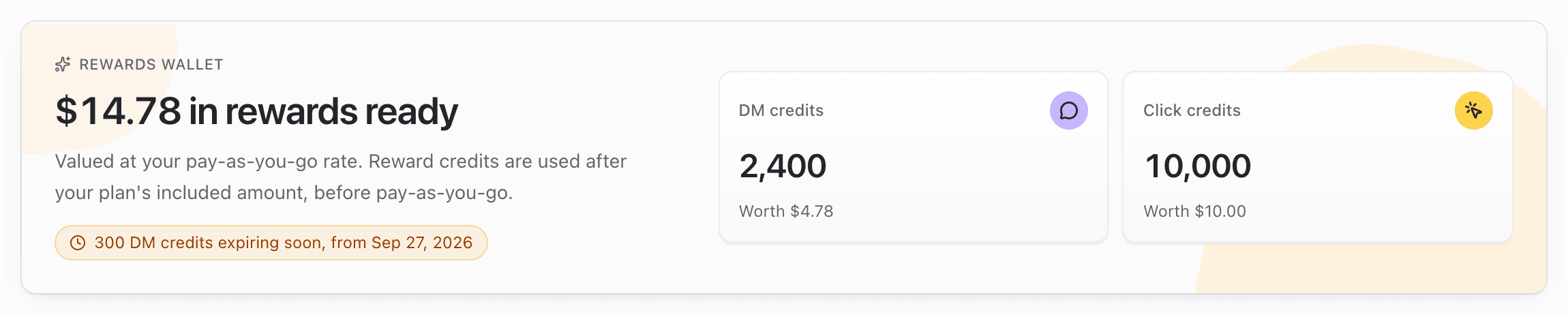
The Rewards wallet at the top of Dashboard → Rewards holds everything your workspace has earned from invites, challenges, promotions and courtesy credits. You never "spend" it by hand. Pointerly uses it automatically once you go past what your plan includes, and always before pay-as-you-go.
What you'll achieve
- Tell the four kinds of reward apart: credits held in the wallet, deposits, add-on access and account credit
- Know exactly when each one is spent, and in what order
- Read the value (Worth $X), the expiry chip and the expiry reminders
- Use History to see every credit added, used, expired or reversed
Before you start
- Right workspace selected. Each workspace has its own wallet.
- Rewards → view access (owners, admins, managers and viewers have it by default).
- Amounts and expiry lengths are set per program by Pointerly staff. The examples below come from the starter programs and are examples only. The terms line under each reward is what applies to you.
The four kinds of reward
| Kind | Rewards | Where it goes | Expires? |
|---|---|---|---|
| Wallet credits | DM credits, click credits, automation runs, routine runs | Held in the wallet as separate batches. Spent after your plan's included amount and before pay-as-you-go | Per program, counted from when the credits were added (for example 30 or 60 days), or never |
| Deposits | Extra links, publish credits (Content Studio), WhatsApp sends, Telegram sends, AI credits | Added straight to that balance or limit when you get them, the same balances purchases use | Extra links and publish credits never expire. WhatsApp and Telegram sends are free sends that are never invoiced. AI credits come as a pack that lasts the number of days in the terms (30 when none is set) |
| Add-on access | A catalog add-on (for example A/B testing) for a set number of days (1 to 365) | Shown under Billing → Add-ons → Active add-ons with a Reward · ends <date> badge | Yes, on its end date. It's never charged and never turns into a paid subscription |
| Account credit | Dollars (for example $10) | Your Stripe customer balance. Taken off your next invoice before your card is charged | Never. See Account credit and invoices |
Only wallet credits appear as tiles on the wallet card. Deposits, add-ons and account credit appear in History and on the Billing page, since they're already applied to your workspace. The one exception is account credit that is still pending: a workspace with no billing account yet sees an Account credit tile reading $10.00 pending — applied once billing is set up.
When wallet credits are spent
Wallet credits carry you past your plan. They're never spent while your plan's included amount still has room, and they're always spent before a pay-as-you-go charge.
| Meter | Order Pointerly follows | When the reward credit is taken |
|---|---|---|
| DMs | Purchased DM credits → your plan's monthly DMs → reward DM credits → overdraft (if support granted one) → pay-as-you-go | At the moment each DM is sent |
| Clicks | Your plan's included clicks → purchased click credits → reward click credits → pay-as-you-go | When the cycle's usage invoice is prepared. Redirects are never blocked either way |
| Automation runs | Your plan's included runs → reward automation runs → pay-as-you-go | When the cycle's usage invoice is prepared |
| Routine runs (custom routines) | Your plan's included runs → reward routine runs → billed runs | When the cycle's usage invoice is prepared |
Within one kind of credit, the batch that expires soonest is used first. Batches with no expiry go last, and ties go to the oldest batch.
DMs on hold: if DMs were waiting because the workspace ran out of DM credits, they start sending again as soon as reward DM credits arrive. WhatsApp and Telegram deposits do the same for messages and posts held on a send limit.
Value: "Worth $X"
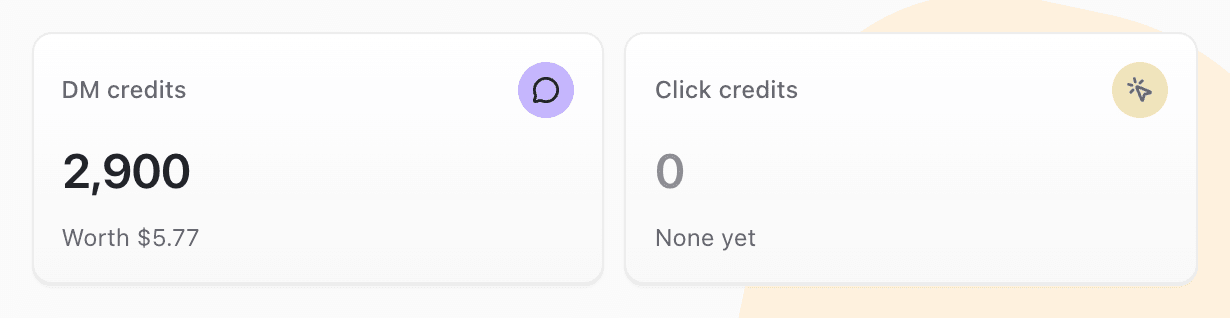
- Each tile shows Worth $X: what the same units would cost at your plan's pay-as-you-go rate. It's what these credits keep off your bill if you use them.
- The heading adds up every balance: $12.45 in rewards ready (Valued at your pay-as-you-go rate.).
- With nothing earned yet, the heading reads Your rewards start here and the DM and click tiles say None yet.
- The Billing page's Reward credits card shows the same balances with worth $X.
Expiry
- A credit's expiry date is fixed when it's added: Credits expire 30 days after they're added.
- The expiry chip under the wallet heading turns amber when something lapses within 7 days: 300 DM credits expiring soon, from Sep 28, 2026. Otherwise it shows Next expiry <date>.
- Reminder: about 3 days before a batch lapses, the workspace owner gets one Rewards notification (in-app and email), for example 300 DM credits and 5,000 click credits expire soon. Everything lapsing for that workspace is grouped into one message, and each batch is only mentioned once.
- On the expiry date, whatever is left of the batch is removed. History shows an Expired row.
- Account credit, extra links and publish credits never expire.
Steps
1. Read your balances
- Open Dashboard → Rewards.
- Read the heading ($X in rewards ready) and the tiles. DM credits and Click credits always show. Automation runs and Routine runs appear once you have some.
- Check the chip under the heading for the next expiry.
2. Check what's been added and used in History
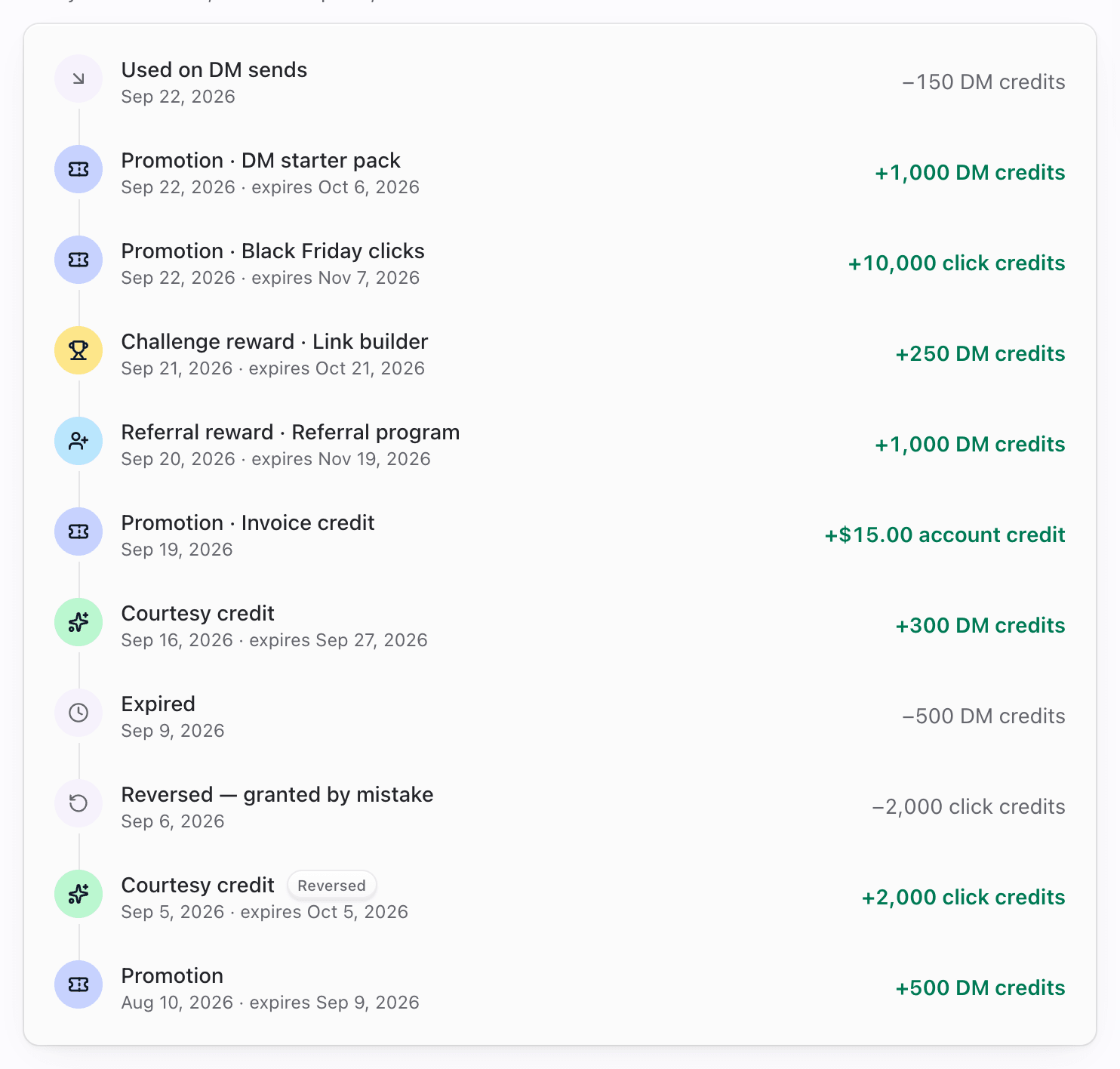
- Scroll to History (Every credit added, used or expired, most recent first.). It lists the 25 most recent entries.
- Read each row:
| Row label | Meaning |
|---|---|
| Referral reward (plus · program name while that program is running) | You earned it for an invite |
| Welcome reward | Your workspace joined through someone's invite |
| Challenge reward | You finished a challenge |
| Promotion (plus · program name while that program is running) | You claimed a promotion or code |
| Courtesy credit | Pointerly staff added it for you |
| Used on DM sends / Applied to click overage | Reward credits spent |
| Expired | What was left of a batch when it lapsed |
| Reversed — <reason> | A reward that staff took back, with their reason |
- Amounts added show in green with a plus sign (+500 DM credits). Spending, expiry and reversals show with a minus sign. A grant with an end date adds · expires <date>. The badges On hold and Reversed mark those states.
3. See the same balances on Billing
- Open Dashboard → Billing (Overview tab).
- The Reward credits card lists each balance with worth $X and a View rewards link.
- Usage meters and the upcoming invoice mark what Rewards covers with From Rewards. See Rewards on your Billing page.

Tips
- Credits you never get past your plan to use will expire unused. That's expected: they exist to cover usage above the plan.
- Planning a big DM campaign? Reward DM credits are used before overdraft and pay-as-you-go, so they're the cheapest units you have after your plan.
- Wallet value depends on your plan's pay-as-you-go rate, so the same 500 credits can show a different Worth $X on a different plan.
Common questions
Are reward credits the same as credit packs I buy? No. Purchased packs never expire and live under Billing → Add-ons. Reward credits are free, may expire, and live in the Rewards wallet. For DMs, purchased credits are spent before your monthly plan DMs, and reward credits after them. See Add-ons and credits.
Why didn't my click credits go down this month? Click, automation-run and routine-run credits are taken when the cycle's usage invoice is prepared, and only for usage above your plan. Until then, Billing previews show what they'll cover. DM credits go down as DMs send.
Why isn't my account credit or my extra links on the wallet card? They're applied at once, so there's nothing left to hold. You'll find them in History and on the Billing page. Account credit shows on the wallet only while it's pending, before it reaches your billing balance.
Can I choose which batch is used first? No. The batch that expires soonest always goes first, so as little as possible lapses.
Can a reward be taken back? Staff can reverse a reward, for example one granted by mistake or through a referral that broke the terms. Units you already used stay used. The History row shows Reversed and the reason.
Troubleshooting
| Symptom | Likely cause | What to try |
|---|---|---|
| Credits never go down | You haven't gone past your plan's included amount | Expected. They're used only for usage above the plan |
| Click credits unchanged mid-cycle | They're taken when the invoice is prepared | Check the upcoming invoice on Billing, where they're already subtracted |
| None yet on every tile | No reward earned in this workspace | Check the team switcher. Earn through invites, challenges or promotions |
| Credits disappeared | The batch reached its expiry date | Look for an Expired row in History and the earlier reminder |
| Deposit reward not visible | Deposits don't show as tiles | Look in History, and on the matching Billing meter (Includes +N … from Rewards) |
| Page says Rewards aren't part of your access | No Rewards permission in this workspace | Ask an owner or admin to grant Rewards access |