Invite creators and earn
Share your invite link, what the creator you invite gets, when and how you're rewarded, the hold period, reversals, review and statuses.
Every workspace has a personal invite link. When another creator opens it and creates a new Pointerly workspace, the two workspaces are linked. The new workspace may get a welcome gift right away. Once it pays its first invoice and a short hold period passes, you get the referral reward.
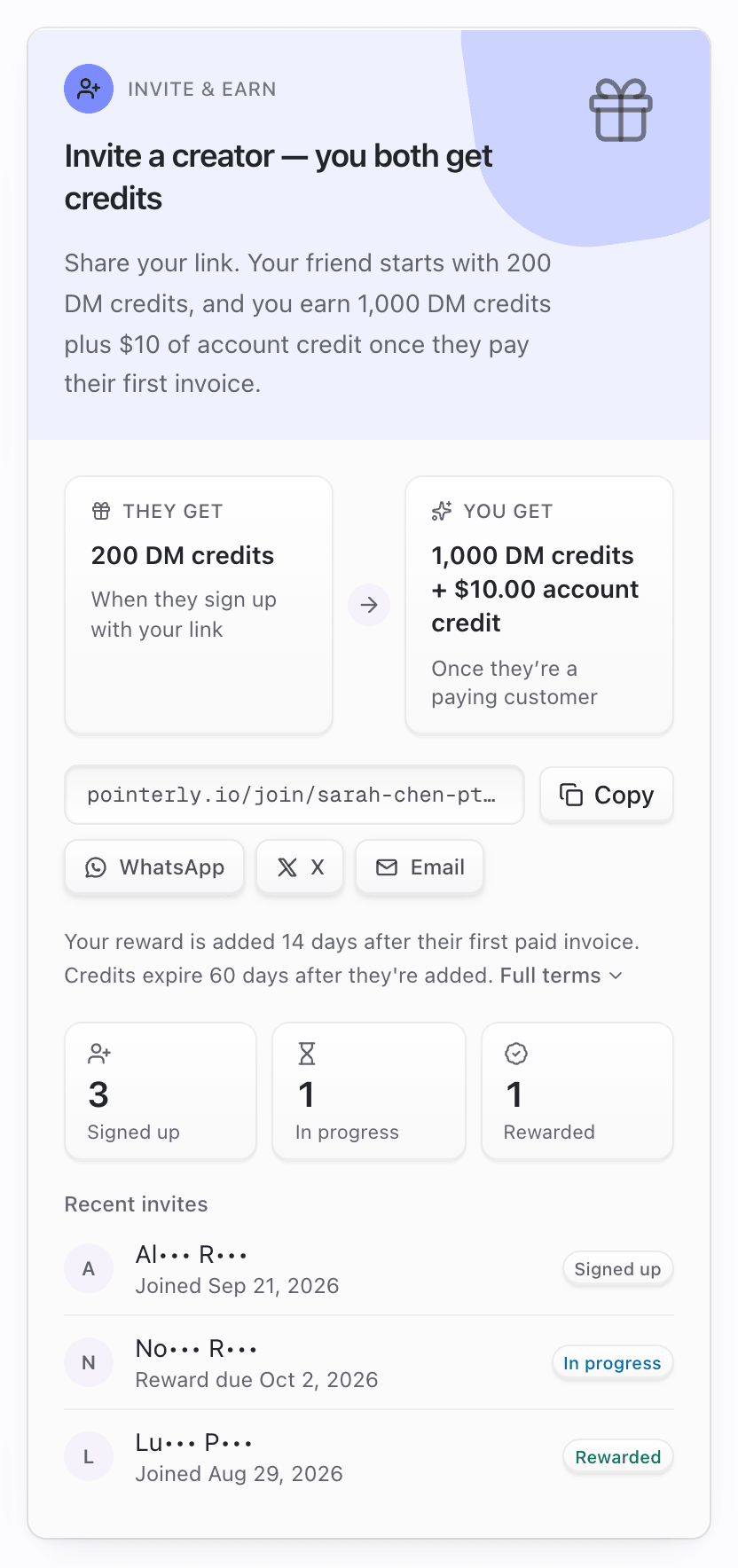
This is the Invite & earn card on Dashboard → Rewards. It also shows up as a card in the sidebar deck and in the What's new & more panel.
What you'll achieve
- Copy or share your invite link
- Know what the person you invite gets, and when
- Know what you get, when, and what can cancel it
- Read the invite statuses (Signed up, In progress, Rewarded, Limit reached, Not eligible, Reversed)
Before you start
- Right workspace selected. The link, its invites and the reward all belong to that workspace.
- Rewards → view access (owners, admins, managers and viewers). Anyone who can see Rewards can copy the link.
- A referral program must be running. Staff turn it on and set the amounts. While none is open (none running, or the current one has handed out all its rewards), the card says There's no referral reward open right now, and new sign-ups through your link aren't recorded as invites.
- Amounts below come from the starter referral program and are examples only: the friend starts with 200 DM credits (expire after 30 days). You earn 1,000 DM credits (expire after 60 days) plus $10 account credit, 14 days after their first paid invoice, for up to 20 rewarded invites per workspace. Your card always shows the real numbers.
Your invite link
- Format:
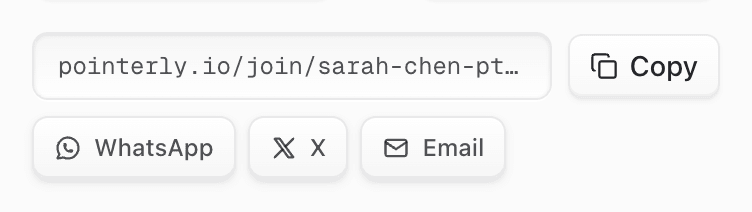
https://pointerly.io/join/<code>. The code is your workspace name plus four characters, for examplemarias-finds-k7q2(lowercase letters, digits and dashes, 3 to 32 characters). It's created the first time you open Rewards. - The same code also works on the sign-up page:
https://pointerly.io/register?ref=<code>. - The link belongs to the workspace. Each workspace you own has its own link.
Your bio page invites for you
Your public bio page carries the same invite. While a referral program is running:
- The Join <name> on Pointerly card that pops up for visitors opens your invite (
/join/<code>?src=bio). When the program has a welcome gift it says so, for example Start with 200 DM credits. - A small Made with Pointerly badge at the bottom of the page uses the same link.
Anyone who signs up that way counts as your invite, exactly like your shared link, and shows in Recent invites as from your bio. When at least one invite came from your bio, the card also shows a line like 3 joined from your bio.
This is on by default. To turn it off, open the bio page in the editor, then ⋮ → Settings → Invite & earn from my bio. With it off, the badge is hidden and the pop-up card goes back to a plain sign-up link. When no referral program is running, the pop-up card uses the plain sign-up link either way.
What the person you invite sees and gets
- Landing page.
/join/<code>shows <Your workspace name> invited you to Pointerly, the welcome gift (when the program has one) and the invite code, with an Accept invite button that opens sign-up. If the code is unknown or no referral program is running, the page says This invite link isn't active anymore, but you can still create your account. If the program has handed out all its rewards, the page says so (Program full): they can still sign up, but there's no welcome gift and the invite isn't recorded. - Remembered for 60 days. The invite is saved in their browser for 60 days, so they can sign up later. The first invite link they open wins, and a second link doesn't replace it.
- Linked on first dashboard visit. When their new workspace first opens the dashboard, it's linked to your invite. The workspace has to be less than 14 days old, and a workspace can only ever be invited once. If they already have an older workspace, opening it doesn't use up the invite: it stays saved (for the rest of the 60 days) and links the next new workspace they create.
- Welcome gift. If the program includes one, it lands in their wallet right away with confetti (Welcome reward) and a notification: Welcome gift: 200 DM credits. Like any wallet credit, it's used after their plan's included amount.
What you get, and when
| Step | What happens | What you see |
|---|---|---|
| 1. They sign up | Their workspace is linked to your invite | Status Signed up. Owner notification: A creator joined with your invite |
| 2. First paid invoice | Their first invoice with an amount above $0 is paid. A $0 invoice (trial, 100% coupon) doesn't count | Status In progress, Reward due <date>. Owner notification: Your invite became a paying customer with the reward date |
| 3. Hold period | A waiting period (for example 14 days) that protects against refunds and chargebacks | Still In progress |
| 4. Reward paid | The rewards job (every 30 minutes) pays you after the hold: your credits and, if the program has it, account credit | Status Rewarded. Confetti, and owner notification You earned a referral reward. History: Referral reward |
Account credit from an invite goes to your Stripe balance and comes off your next invoice. See Account credit and invoices.
If staff pause or end the program after someone signed up with your link, invites already recorded still go through these steps and get paid. The reward, account credit and hold period are locked in when they sign up: if the program changes later, invites already recorded are paid what was offered at that moment.
What can stop a reward
| Situation | Result |
|---|---|
| Full refund or dispute of their first paid invoice during the hold | The invite becomes Reversed and pays nothing |
| Partial refund during the hold, or a refund of something else they bought later (for example a one-off pack) | Nothing changes. The invite keeps going |
| Refund after you were paid | Nothing changes. Rewards already paid aren't taken back from you |
| Per-workspace limit reached (for example 20), or the program has handed out all its rewards | When the invite would be paid, it shows Limit reached and pays nothing. You get a notification: Thanks for inviting another creator |
| They never pay an invoice | The invite stays Signed up |
| Workspace older than 14 days, already invited, or your own workspace | The invite isn't recorded |
| No referral program running when they first open the dashboard | The invite isn't recorded |
Review for duplicate accounts
Pointerly checks each new invite, and again at its first payment, for signs that it isn't really a new creator. For example:
- Same person on both sides. If someone is a member of both your workspace and the invited one, the invite goes to staff review. The invited workspace gets no welcome gift, and you get no sign-up notification.
- Shared company email domain. Matching private email domains (not Gmail, Outlook, iCloud and the like) are noted. On their own they don't block anything, because agencies and brands legitimately invite their own creators.
While in review, the invite shows In progress. Staff then either approve it or mark it Not eligible. An approved invite continues like any other: if they haven't paid yet, it goes back to Signed up; if they have, it pays when the hold ends (or right away if the hold is already over). Self-referrals and duplicate accounts aren't eligible under the program terms.
Invite statuses
| Status on your card | Meaning |
|---|---|
| Signed up | Their workspace was created with your link. Waiting for a first paid invoice |
| In progress | They paid their first invoice and the hold is running (Reward due <date>), or staff are reviewing the invite |
| Rewarded | You were paid |
| Limit reached | Your workspace had reached the program's per-workspace limit, or the program had handed out all its rewards, when this invite would have been paid |
| Not eligible | Staff declined it |
| Reversed | Their first paid invoice was refunded in full or disputed during the hold |
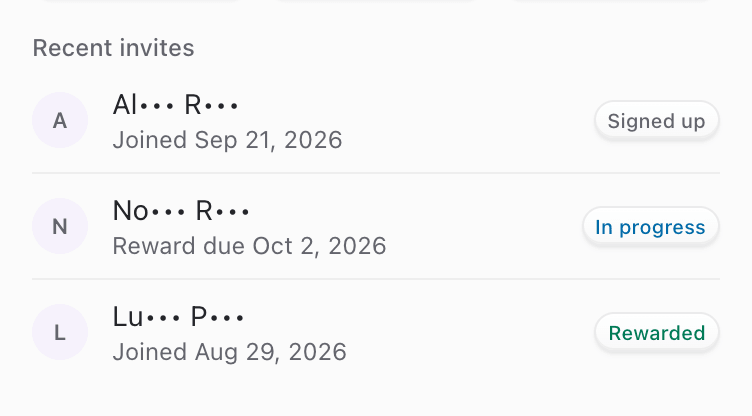
The counters on the card show Signed up (all invites), In progress and Rewarded. Recent invites lists the latest 10.
Privacy
Invited workspaces show with part of the name hidden, for example Ma••• F••• for "Maria's Finds": enough to recognise a friend, not enough to identify strangers. The person you invite never sees your wallet or your invite list. Their landing page shows your workspace name, so name your workspace the way you'd like to be introduced.
Steps
1. Copy or share your link
- Open Dashboard → Rewards and find Invite & earn (on the right on wide screens, under the wallet on phones).
- Click Copy next to the link (toast: Invite link copied), or use WhatsApp, X or Email to open a message with your link filled in.
- Shortcut: in the sidebar deck (or What's new & more in the top bar layout), click the copy icon on the Invite & earn card.
2. Check the terms before you share
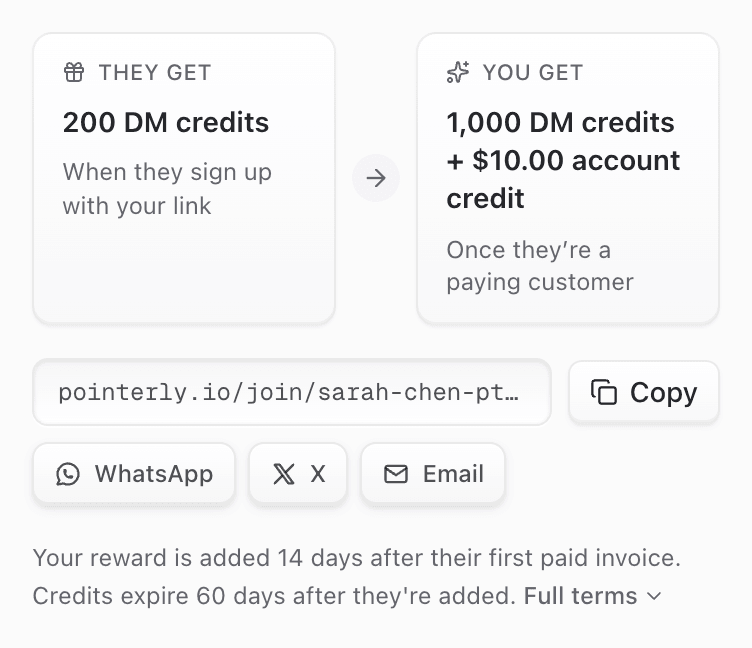
- Read They get and You get (for example 1,000 DM credits + $10.00 account credit, Once they're a paying customer).
- Read the summary line (Your reward is added 14 days after their first paid invoice. Credits expire 60 days after they're added.).
- Click Full terms for the complete program terms.
3. Follow your invites
- Watch the Signed up / In progress / Rewarded counters.
- Under Recent invites, each row shows the masked name, Joined <date> or Reward due <date> (plus from your bio when they came through your bio page), and the status.
- When the reward lands, it appears in the wallet and in History as Referral reward.
Tips
- Share with creators who'll actually use Pointerly. You're paid when they become a paying customer, not when they sign up.
- Tell them to open your link first. The first invite link they open is the one that counts.
- They should sign up and open the dashboard within 14 days of creating the workspace for the invite to be recorded.
- Don't invite yourself or a second workspace of your own. It's sent to review and won't be paid.
Common questions
When exactly do I get paid? After the invited workspace's first paid invoice (above $0), plus the hold period in the terms (for example 14 days), on the next run of the rewards job (every 30 minutes).
Does it matter which plan they pick? No. What counts is that an invoice above $0 is paid.
Can I invite someone who already has a Pointerly workspace? Only a workspace created in the last 14 days, and never invited before, can be linked. Established workspaces can't be linked to an invite later. If they open your link and then create a new workspace within 60 days (in the same browser), that new workspace is linked.
What if they signed up without my link? The invite can't be added afterwards. It's only recorded from the link, on their first dashboard visit.
Where do my referral rewards go? Credits go to your rewards wallet. Account credit goes to your Stripe balance and comes off your next invoice.
Do visitors of my bio page count? Yes, when Invite & earn from my bio is on (the default) and a referral program is running. They follow the same rules as your shared link: first invite link wins, new workspace, 14 days.
Can I change my invite code? Not from the dashboard. The code is created from your workspace name the first time you open Rewards.
Troubleshooting
| Symptom | Likely cause | What to try |
|---|---|---|
| Friend signed up but isn't in Recent invites | Opened another invite link first, signed up in a different browser, workspace older than 14 days, or no program running at the time | Invites can't be added by hand. Make sure future invites open your link first, in the browser they sign up with |
| Stuck on Signed up | They haven't paid an invoice above $0 yet | Expected until their first paid invoice |
| Stuck on In progress | Hold still running (see Reward due), or staff review | Wait for the due date. Reviews are decided by staff |
| Reversed | Their first paid invoice was refunded in full or disputed during the hold | Final for that invite |
| Limit reached | Your per-workspace limit, or the program ran out of rewards | Check the program terms for the limit. A new program may open later |
| Not eligible | Declined in review | Final for that invite |
| Card says There's no referral reward open right now | No live referral program, or it has handed out all its rewards | Sign-ups while no program is open aren't recorded as invites |
| No Invite & earn card in the sidebar | No live program, or no Rewards access | Open Dashboard → Rewards, or ask an admin for access |