Rewards on your Billing page
Where reward credits, deposits, reward add-ons and account credit show on Billing: usage meters, on-demand usage, the invoice preview and Active add-ons.
Anything Rewards changes on your bill is labelled on Dashboard → Billing, in green with a gift icon and a From Rewards link that opens /dashboard/rewards. It tells you which part of a meter, limit, add-on or invoice total came from a reward and not from your plan or a purchase.
What you'll achieve
- Find reward credits on the Billing Overview tab
- Read reward lines on usage meters, on-demand usage and the upcoming invoice
- Recognise add-ons that a reward unlocked (Reward · ends <date>)
- Know that amounts on Billing already account for your rewards
Before you start
- Billing → view to open Billing. Reward lines on Billing come from the same data as the Rewards page.
- The Reward credits card on Billing also needs Rewards → view. Without it, the card simply doesn't show.
Where rewards show on Billing
| Place (Billing tab) | What you'll see |
|---|---|
| Overview → under your current plan | Account credit $15.00 — applied to your next invoice before your card is charged with a From Rewards badge. See Account credit and invoices |
| Overview → Upcoming invoice | Pay-as-you-go section with your reward credit lines and Usage above your plan is drawn from these first; the estimate already accounts for them. Usage lines can say N covered by your reward credits. Reward add-ons are listed at $0 with Reward · ends <date> and Granted by Rewards — not charged, does not renew. The Account credit row sits in the Summary |
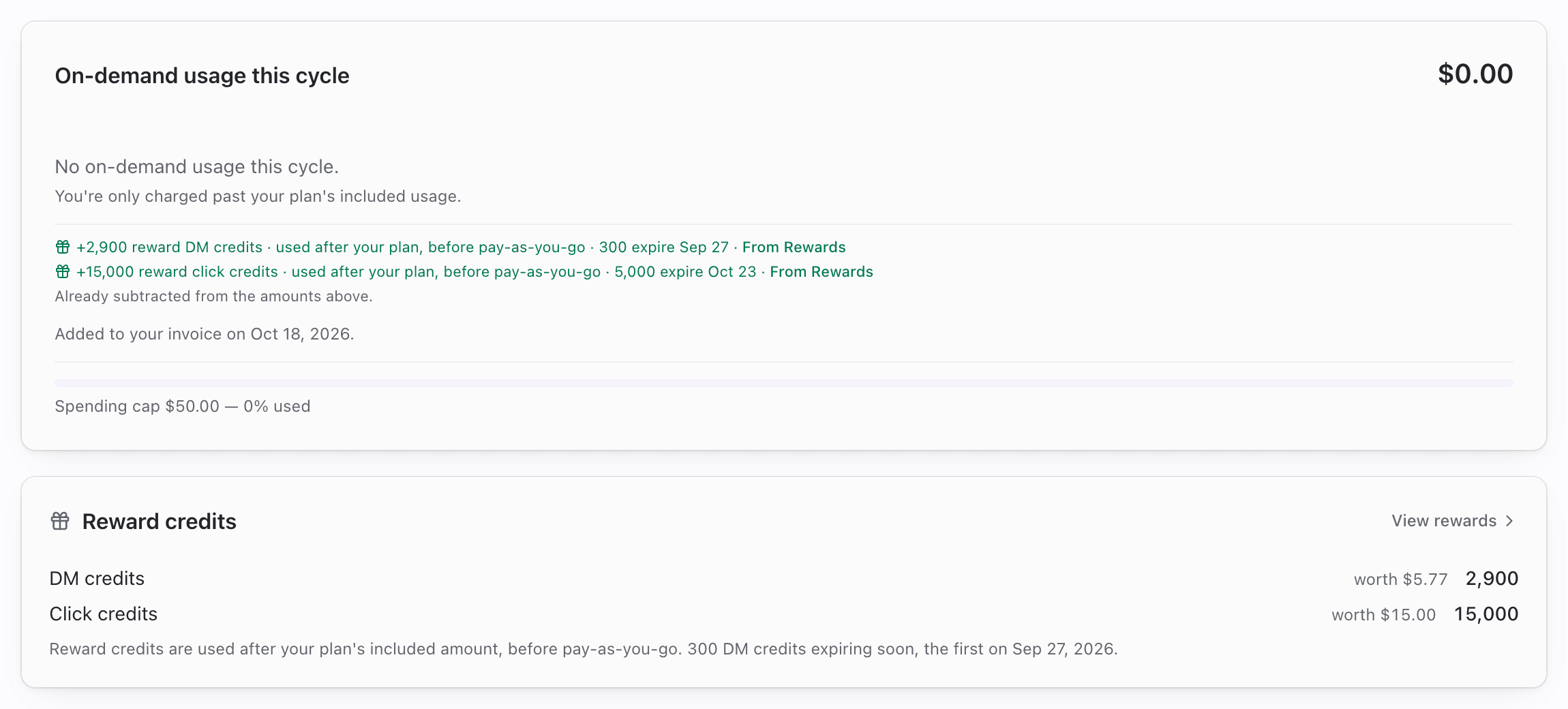
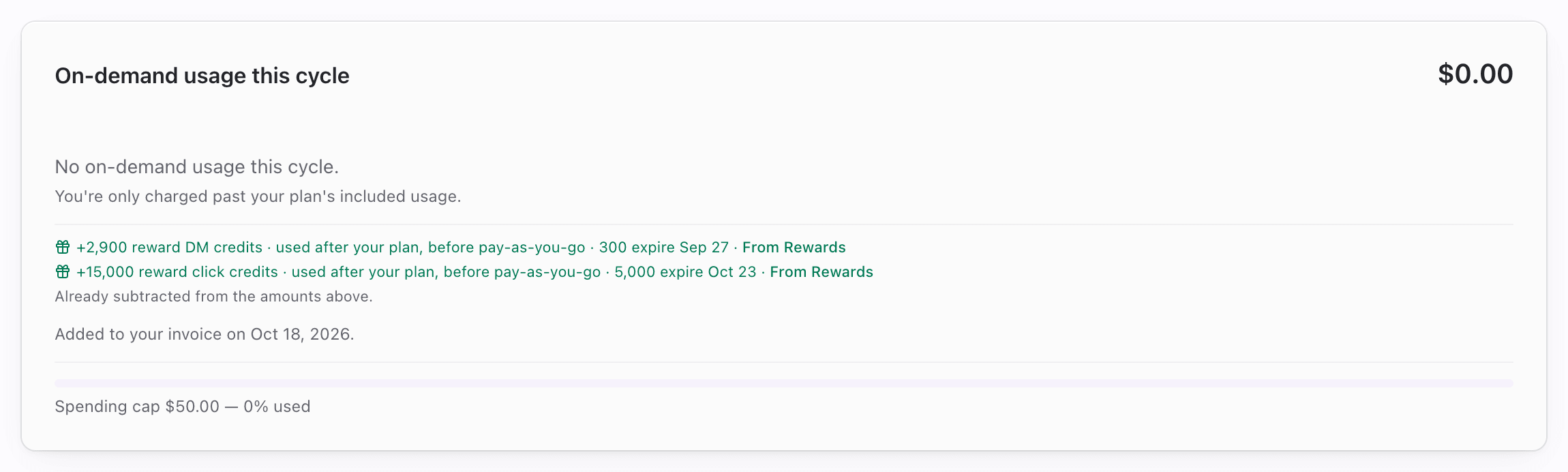
| Overview → On-demand usage | Reward credit lines under the total, with Already subtracted from the amounts above. |
| Overview → Reward credits card | Each wallet balance with worth $X, a note on the next expiry, and View rewards. Shows when you have a balance or a referral program is running |
| Overview → Usage meters | On the matching meter: +300 reward DM credits · used after your plan, before pay-as-you-go · expire Sep 28 · From Rewards. For deposits: Includes +100 link slots from Rewards · From Rewards (AI credits add · expire <date>) |
| Add-ons → Active add-ons | A reward add-on shows Ends <date> and a Reward · ends <date> badge (Granted by Rewards — not charged and does not renew.) |
Which meter each reward lands on
| Reward | Billing meter |
|---|---|
| DM credits | DM sends |
| Click credits | Clicks |
| Automation runs | Automation runs |
| Routine runs | Routine runs |
| Extra links | Links |
| AI credits | AI credits |
| WhatsApp sends | WhatsApp messages |
| Telegram sends | Telegram posts |
| Publish credits | Content Studio publications |
Steps
1. Check reward credits against this cycle
- Open Dashboard → Billing (Overview).
- Read On-demand usage. When reward credits apply, their lines appear under the total with Already subtracted from the amounts above.
- Open the Reward credits card for the full balance, or click From Rewards on any line to open the wallet.
2. Read the upcoming invoice
- On Upcoming invoice, open the Pay-as-you-go section (This cycle).
- Look for N covered by your reward credits on usage lines, and the green reward credit lines under the subtotal.
- If you have reward credits but no usage charge yet, the section shows No usage charges so far. with your reward credits listed.
- Check the Summary for Account credit and Total due.

3. Check reward add-ons
- Open Billing → Add-ons.
- Under Active add-ons, a reward add-on has the Reward · ends <date> badge and Ends <date> in its details.
- On its end date it simply ends. It isn't charged and it doesn't turn into a paid add-on. To keep the feature afterwards, buy the add-on from the catalog.

Tips
- The invoice preview only looks at your reward credits. Click, automation-run and routine-run credits are actually taken when the usage invoice is prepared, so the preview and the final invoice match.
- If a meter shows Includes +N … from Rewards, that amount is already in the meter's limit or balance.
- A reward add-on that ends doesn't affect a paid add-on of the same kind you buy later.
Common questions
Why is my usage charge lower than usage × rate? Reward credits (and purchased credits) covered part of it. The detail line says how many units covered by your reward credits.
Do I need pay-as-you-go on for reward credits to work? It depends on the credit.
- DM and routine-run credits are used past your plan whether pay-as-you-go is on or off.
- Click and automation-run credits are only used when pay-as-you-go for that meter is on. With it off, usage above your plan isn't billed at all, so your credits are kept for later instead of being spent on usage you wouldn't have paid for. Purchased click credits work the same way.
Separately, some challenges and promotions ask you to turn pay-as-you-go on before you can join or claim.
Why is there a $0 add-on on my invoice preview? It's an add-on a reward unlocked. It's listed so you can see it's active, and it's never charged.
Troubleshooting
| Symptom | Likely cause | What to try |
|---|---|---|
| No Reward credits card | No balance and no referral program running, or no Rewards access | Expected. Open Dashboard → Rewards if you have access |
| No From Rewards lines on meters | No reward affects those meters | Expected |
| Reward add-on missing from Active add-ons | It already ended, or it was reversed | Check Rewards → History |
| Invoice preview doesn't show credits you expected | They're not for that meter, or you're still inside your plan's included amount | Reward credits only cover usage above the plan |