Promotions and promo codes
Claim a promotion or redeem a promo code, who can claim, and what every 'can't claim' message means.
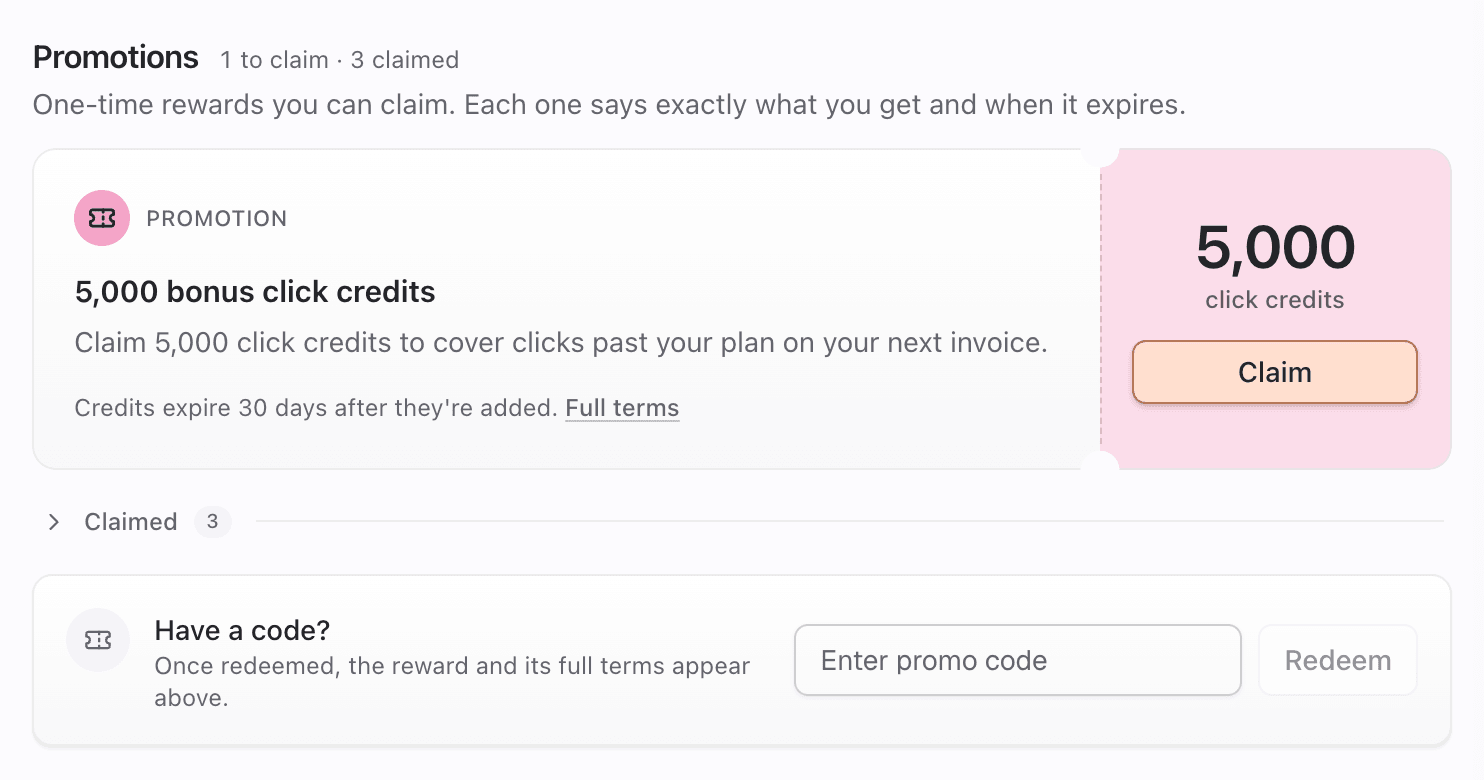
Promotions are one-time rewards you claim with one click: bonus click credits, DM credits, extra links, a few weeks of an add-on, or account credit. Some are listed for everyone who's eligible. Others are promo codes that Pointerly or a partner gives you. Codes stay hidden until you redeem them.
Both live in the Promotions section of Dashboard → Rewards (One-time rewards you can claim. Each one says exactly what you get and when it expires.).
What you'll achieve
- Claim a listed promotion
- Redeem a promo code
- Understand why a claim can be refused, and fix it when you can
- Find what you've already claimed
Before you start
- Right workspace selected. Each promotion can be claimed once per workspace.
- Rewards → manage to claim or redeem (owner and admin by default). Managers and viewers see promotions but can't claim.
- Staff set what each promotion gives and who can claim. The starter example is 5,000 bonus click credits that expire 30 days after you claim them, limited to the first 1,000 workspaces. Example only.
Who can claim
A promotion can have any of these rules. The terms under it say which apply:
| Rule | Details |
|---|---|
| Dates | Only between its start and end dates. With an end date you'll see Claim by <date> |
| Plans | Can be limited to certain plans (Free, Individual, Team, Enterprise) |
| New workspaces only | Only workspaces created after the promotion started |
| Pay-as-you-go | May require pay-as-you-go for DMs or clicks to be turned on |
| Limited quantity | May be capped at a number of claims in total. Once they're gone, they're gone |
| One per workspace | Always. A second claim is refused |
Steps
1. Claim a listed promotion
- Open Dashboard → Rewards → Promotions.
- Read the reward (for example 5,000 click credits), the one-line terms (Credits expire 30 days after they're added. Claim by Oct 31, 2026.), and Full terms if you want the details.
- Click Claim.
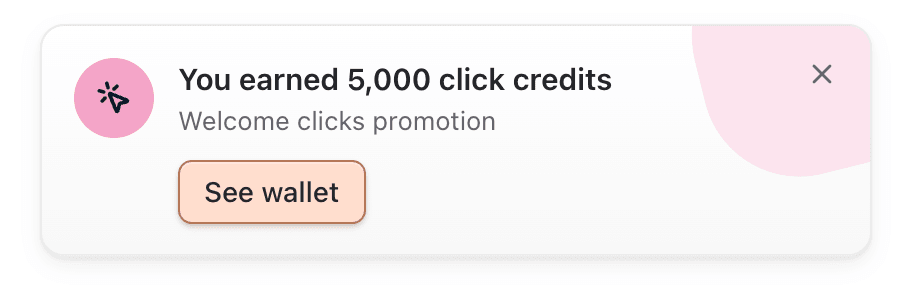
- On success you get confetti and the card You earned 5,000 click credits, and the promotion moves to Claimed. The workspace owner is also notified: 5,000 click credits added — Your promotion is in your rewards wallet — use it by <date>.
2. Redeem a promo code
- At the bottom of Promotions, find Have a code?
- Type the code in Enter promo code and click Redeem. Codes aren't case-sensitive.
- On success the code box clears, you get confetti, and the promotion appears in the list (Once redeemed, the reward and its full terms appear above.).
- If it doesn't work, the reason appears under Have a code? (see the table below). When the fix is pay-as-you-go, a Turn on pay-as-you-go button appears next to it.

3. See what you've claimed
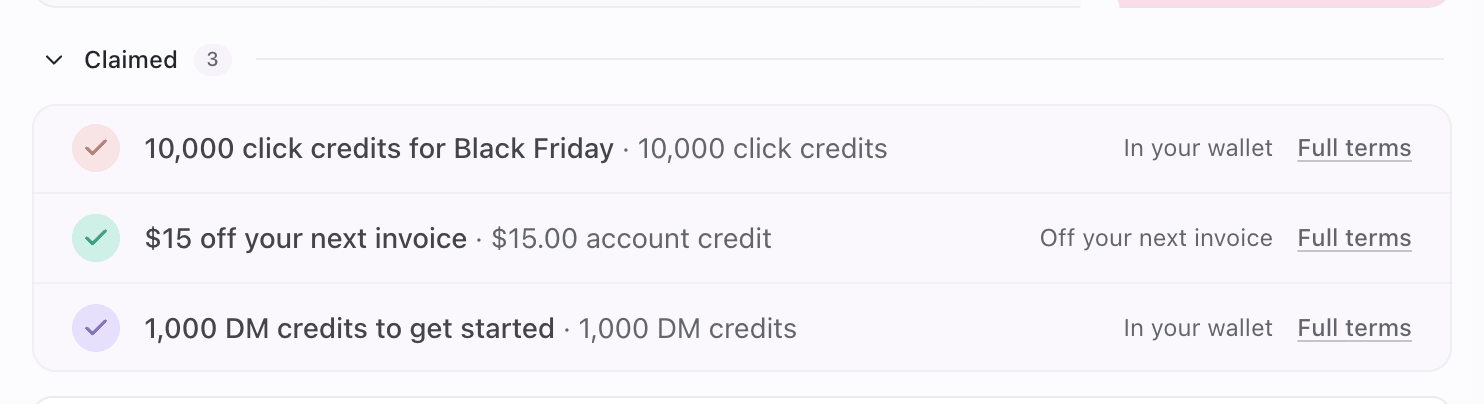
- Claimed promotions move to the Claimed group with a Claimed stamp.
- Each row says where the reward went:
| Row says | Reward type |
|---|---|
| In your wallet | DM credits, click credits, automation runs or routine runs |
| Added to your balance | Extra links, publish credits, WhatsApp or Telegram sends, AI credits |
| Add-on unlocked | Add-on access for a set number of days |
| Off your next invoice | Account credit |
- The claim also appears in History as Promotion.
Why a claim can be refused
These are the exact messages you may see after clicking Claim or Redeem:
| Message | Meaning | What to do |
|---|---|---|
| Turn on pay-as-you-go in Billing to join this. | This promotion needs DM or click pay-as-you-go on | Click Turn on pay-as-you-go (opens Billing → Add-ons), turn on the meter, then claim again |
| You already claimed this reward. | This workspace already claimed it | Nothing to do. Find it under Claimed |
| This reward has run out. | All available claims have been handed out | Wait for another promotion |
| This reward is not available right now. | Not started yet, paused or ended | Check the dates in the terms |
| This reward is not available on your plan. | Limited to other plans | Upgrade, or use another workspace on an eligible plan |
| This reward is for new workspaces only. | Your workspace was created before the promotion started | Not claimable here |
| That code is not valid | Unknown code, or the promotion isn't active | Check the spelling. Codes stop working when a promotion is paused or ends |
| Enter a code | Fewer than 3 characters | Type the full code |
| Codes only use letters, numbers, - and _ | The code has spaces or other symbols | Remove them |
| The reward could not be applied to the workspace | The reward couldn't be added (for example an add-on that can't be unlocked) | Try again later, or contact support. Nothing was granted |
Before you click, listed promotions you can't claim show a calmer note instead of the Claim button, for example Available once pay-as-you-go for clicks is on., This one isn't available on your current plan. or This one is for newly created workspaces.
Tips
- Claimed credits start their expiry clock at claim time. Claim when you expect to use them.
- Promo codes are revealed by the code only. Someone else's list may show promotions you don't see, and the other way round.
- A claim is per workspace. With several workspaces, switch to the one that should get the reward first.
Common questions
I have a code but no Promotions list. Where do I type it? The Have a code? box is always at the bottom of Promotions, even when nothing else is listed.
Can I claim the same promotion in two workspaces? Yes, if both are eligible. The one-claim limit is per workspace.
Does claiming cost anything or start a subscription? No. Promotions never charge you. Add-on access from a promotion ends on its date and never renews.
What happens to account credit from a promotion? It goes to your Stripe balance and comes off your next invoice. See Account credit and invoices.
Troubleshooting
| Symptom | Likely cause | What to try |
|---|---|---|
| No promotions to claim | Nothing live for your workspace | Check back later, or redeem a code |
| You've claimed everything on offer | You've claimed every live promotion | New ones show up when they open |
| Claim missing, a note shown instead | Not eligible yet (pay-as-you-go, plan, new workspaces only) | Follow the note. Turn on pay-as-you-go if asked |
| You do not have permission to manage Rewards. | You can view Rewards but not claim (manager, viewer) | Ask an owner or admin to claim, or to grant Rewards → manage |
| Code rejected | Typo, extra characters, or promotion not active | Re-type it. Ask whoever gave you the code if it's still running |