Links troubleshooting
Fix broken redirects, slug conflicts, duplicates, tag mismatches, smart routing gaps, immutable destinations, and quota blocks.
Use this guide when a short link won’t create, won’t redirect, attributes to the wrong store, or smart routing / bulk import behaves unexpectedly.
What you'll do
- Confirm status, destination, and tag on the link
- Match symptoms to the most common causes
- Apply a focused fix, then retest the public short URL
Before you start
- Confirm you are in the correct team
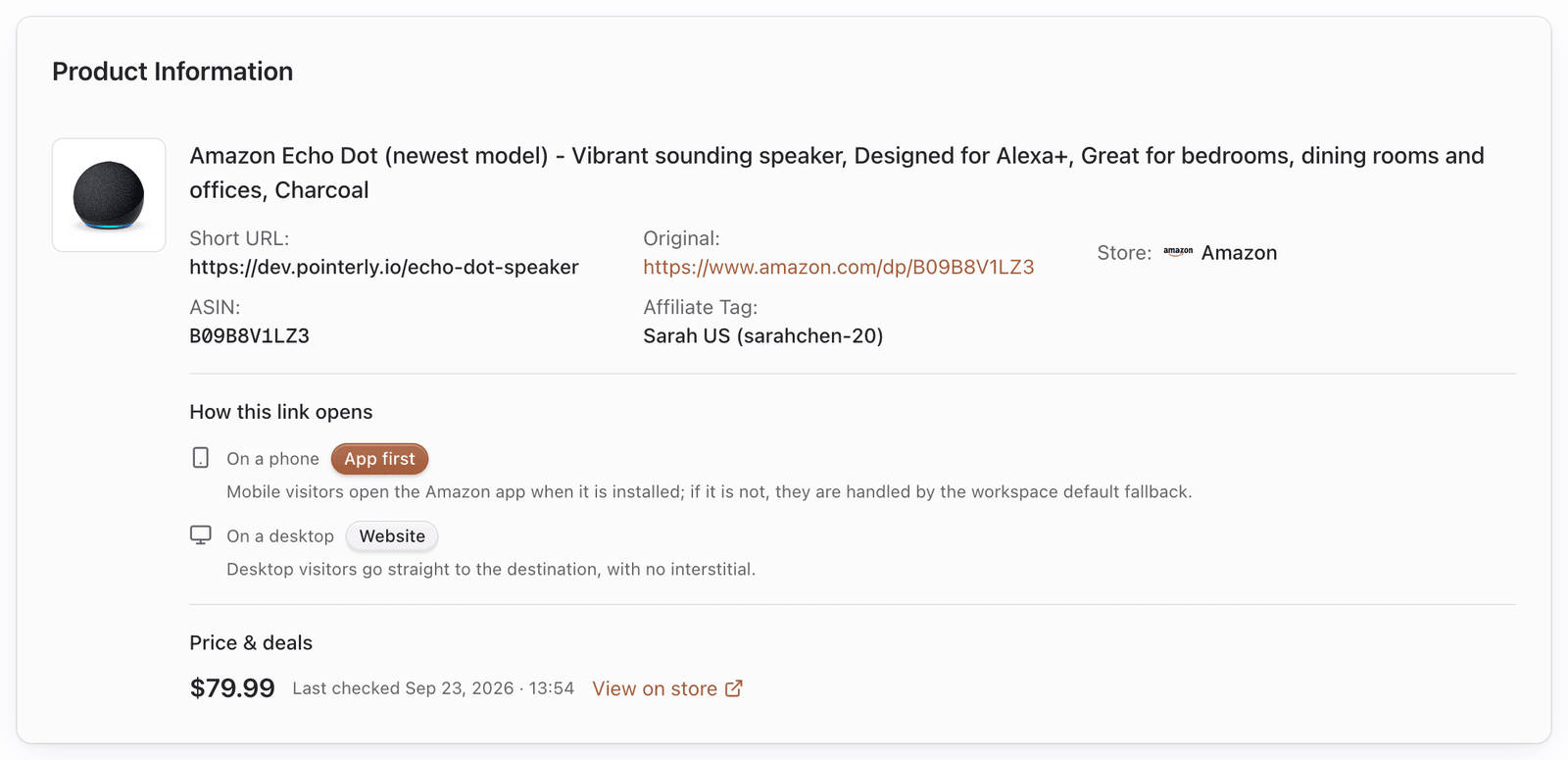
- Note the short URL, destination URL, store, and affiliate tag on the link
- Try the short URL in a private / incognito window (and once on mobile) so caches and apps don’t mislead you
Quick checks
- Go to Dashboard → Links and find the link.
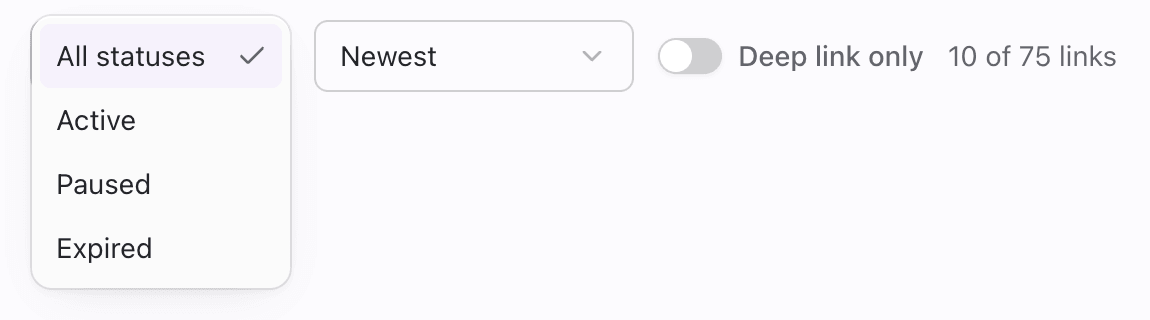
- Confirm status:
- Active — should redirect
- Paused — redirects stopped on purpose → Resume (unless limit-frozen)
- Expired — past expiry → clear or change expiry / recreate
- Open the destination URL directly. If the store page is dead, you generally cannot paste a new destination in Edit — create a new link, or use campaign relink only for the same Amazon ASIN Creator Connection URL.
- Confirm the affiliate tag matches the store and marketplace of the destination.
- Read the mobile / desktop routing summary on the link (App first, Web only, Send to phone, No app found, and so on) so expectations match settings.
Common issues
Can’t create a link / “Get more links”
| Likely cause | What to try |
|---|---|
| Plan link limit reached | Billing → link credits / pay-as-you-go / upgrade; pause or delete unused links |
| Missing create permission | Ask a team admin for Links create access |
| Invalid or blocked URL | Paste a normal https product URL from a supported store |
| Storefront upgrade required | Individual+ for Amazon storefront links / list import |
Duplicate product warning
Message like: You already have a link for this product with this affiliate tag.
| Likely cause | What to try |
|---|---|
| Same Amazon ASIN + same tag already exists | Reuse the existing short URL |
| Campaign URL should replace the old destination | Use relink when the create dialog or Edit → Campaign relink offers it (keeps slug and history; same ASIN only) |
| Soft-deleted link for the same key | Create may reactivate; check the existing link first |
| Intentional second link | Use create another when the UI offers ASIN siblings |
Can’t change the destination URL
| Likely cause | What to try |
|---|---|
| Destinations are immutable in Edit | Create a new link for a different product |
| Need campaign URL on same product | Paste the full Amazon campaign URL into Campaign relink (not a short a.co link) |
| Wrong ASIN on campaign URL | Create a new link — relink refuses different products |
Slug conflicts or unwanted slug
| Likely cause | What to try |
|---|---|
| Custom slug already taken on that domain | Choose another slug or use a suggested unique slug |
| Invalid characters / length | Use 3–50 lowercase letters, numbers, hyphens (no leading/trailing hyphen) |
| Changed slug after sharing | Old slug may redirect via alias when preserved — still update posts if unsure |
Wrong store or missing commissions
| Likely cause | What to try |
|---|---|
| Affiliate tag marketplace ≠ product host | Attach a tag for that marketplace |
| Tag missing on Amazon / eBay / Walmart | Create can’t save without a valid tag — create a tag |
| Smart routing sent visitor to another locale | Check variants and ?mp= / geo coverage — see Smart routing |
| Visitor country has no active variant | Add an active variant for that marketplace, or accept default |
| Multiple ASIN siblings | Amazon reports may split estimates by click share among siblings |
Redirects feel “broken” on mobile or desktop
| Symptom | Likely cause | What to try |
|---|---|---|
| Always opens web, never the app | Deep linking off, or store isn’t Amazon | Enable deep link first on Amazon; other stores stay web |
| Desktop interstitial / QR unexpected | Desktop linking mode is handoff or app+handoff | Edit link → set Desktop linking to off if you want a straight redirect |
| Badge No app found | Desktop app mode on, but destination isn’t a known desktop app | Turn desktop linking off, or use a destination with a supported desktop app |
| Amazon short link fails on create/import | Share URL couldn’t be resolved | Open in browser; paste the final amazon.…/dp/… URL |
| Resume does nothing / error | Link is limit-frozen over quota | Buy capacity / PAYG / upgrade — oldest frozen links thaw first |
Smart routing problems
| Symptom | Likely cause | What to try |
|---|---|---|
| Feature locked / upgrade | Plan doesn’t include marketplace routing | Upgrade, or keep a single destination |
| No marketplaces to add | No tags for other locales | Add marketplace tags first |
| Save blocked — marketplace mismatch | Variant URL host ≠ selected marketplace | Paste a URL from the selected locale |
| Always default store | Variant inactive or missing for that country; or ?mp= has no matching active variant | Activate / add the variant |
See the full flow in Smart routing.
Bulk import problems
| Symptom | Likely cause | What to try |
|---|---|---|
| Upgrade instead of file import | No bulk_actions entitlement | Upgrade to Individual or higher |
| Upgrade on Amazon list/storefront | No storefront_links entitlement | Upgrade; file import is a different gate |
| All rows skipped as duplicates | ASINs already linked with that tag | Filter to new products only |
| Partial import | Quota mid-run | Free capacity; re-import remaining rows or confirm PAYG |
| Amazon tag not applied | Used tag value instead of name, or typo; or non-Amazon row | Use the tag name from Affiliate Tags; leave blank for Amazon default; never expect Amazon default on Temu/etc. |
| List import refused | More than 200 products in one request | Split the list |
Details: Bulk actions.
Bundles
| Symptom | Likely cause | What to try |
|---|---|---|
| Can’t create | Fewer than two links or empty title | Select 2+; set a title |
| Member product doesn’t convert | Member link paused / wrong tag / frozen | Fix the member link itself |
| Confused with groups | Groups are organizational only | Use Bundles for a public /s/… URL |
Details: Link bundles.
Common questions
What happens if I change the destination URL?
In Edit, destinations are fixed. The only in-product exception is Creator Connection campaign relink for the same Amazon ASIN (full campaign URL, not a shortener). That keeps the short URL and click history. For a different product, create a new link.
Can one link have multiple marketplace tags?
Primary destination: one tag. Smart routing variants: one tag each. Together they cover multiple marketplaces under one short URL.
Smart routing vs default URL?
Enabled routing: ?mp= (if active variant) → geo (if active variant) → default. Disabled or no match: always default URL + primary tag.
Bulk import limits / Amazon-only tag rules?
File import needs bulk_actions; Amazon list/storefront needs storefront_links. Lists cap at 200 items per request. CSV affiliate_tag is Amazon-only (tag name); ignored elsewhere. Quota skips extras mid-run.
Bundles vs groups?
Groups = internal folders. Bundles = public /s/… pages of ≥ 2 links.
Retest checklist
After a fix:
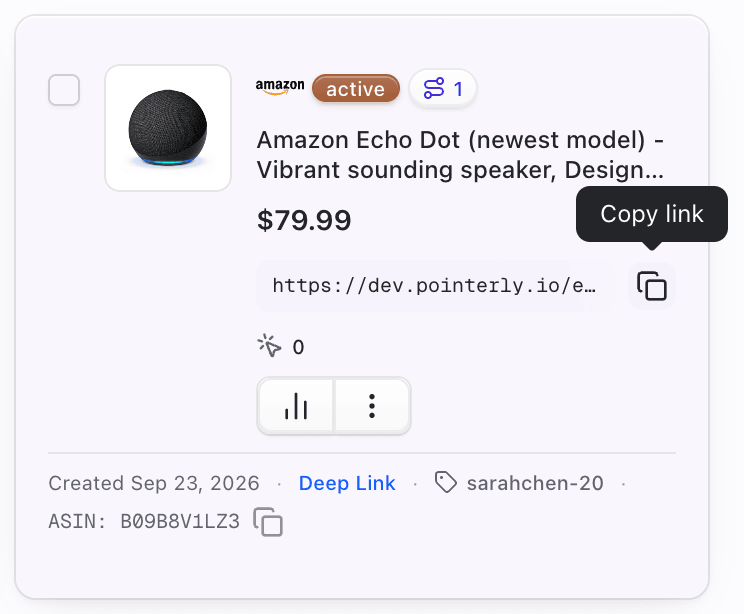
- Copy the short URL from the link card / row.
- Open it in a private window on desktop.
- Open it once on a phone (with and without the store app, if deep linking matters).
- For smart routing, test with
?mp=for a known active variant marketplace. - Confirm the affiliate parameters you expect still appear on the final store URL when applicable.
Tips
- Prefer fixing status and understanding immutable destinations before changing slug — slug changes affect every place you’ve already shared the URL (aliases may preserve old paths).
- Keep a small set of well-named marketplace tags; most routing bugs are tag coverage gaps.
- When reporting an issue to support, include: short URL, destination, store, tag name, team name, and whether the failure is create-time or click-time.